![checkin-logo-1.svg]](https://www.checkin.no/hubfs/checkin-logo-1.svg)
You can charge for your events in Checkin in the following currencies:
- Norwegian kroner (NOK)
- Euro (EUR)
- Danish kroner (DKK)
- Swedish kronor (SEK)
One currency per event
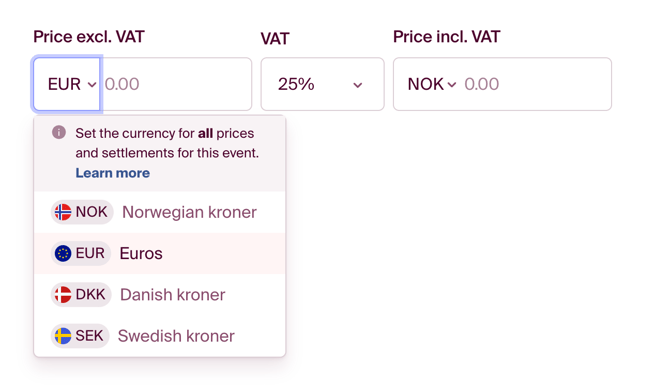
Each event has one selected currency. When you enter the first price, you choose the currency from a dropdown.
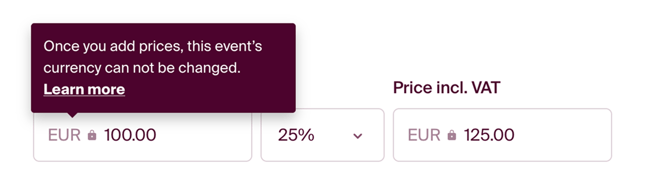
As soon as you set a price, the currency is locked.
From that point on:
- All prices are set in the same currency
- Participant payments are processed in this currency
-
Payouts and any refunds also follow this currency
Changing the currency
Before publishing
If the event has not been published yet, you can change the currency:
-
Remove all prices and save
-
The currency will unlock automatically
-
Choose a new currency and re-enter the prices
After publishing
Once the event is published, the currency can no longer be changed.
If you need to change the currency after publication, it must be done in a new event:
- Duplicate the event
- Follow the “Before publishing” steps
- Cancel the old event and update any incoming links to point to the new one
A payout account is required to publish
The event must have a payout account that supports the selected currency before it can be published.
These can be set up by users with write access to Economy:
-
In the event’s Payment step
-
Or under Economy › Payout accounts
How we handle payments per currency
Incoming and outgoing payments are processed through CheckinPay’s bank accounts in the corresponding currencies. These accounts are located in the following countries:
-
NOK in Norway
-
SEK in Sweden
-
DKK in Denmark
-
EUR in Denmark
Note that transfers between accounts in different countries or currencies may result in currency conversion and additional fees from banks or payment providers. We therefore recommend payouts to a bank account in the same country and currency.